Thursday, December 9, 2010

Step By Step Computer Assembly ...

Written by YUDHA KURNIAWAN
The following will be discussed on how to assemble a computer, especially for those just learning .. from some references that I learned .. then the following will be explained step by step how to assemble a computer, hopefully useful .. Red. deden

Components of computer assemblers are available on the market with a wide selection of quality and price. By assembling your own computer, we can determine the type of component, capabilities and facilities of the computer according kebutuhan.Tahapan in computer assembly consists of:

A. Preparation
B. Assembly
C. Examination
D. Handling Problems

rakit1.jpg


rakit1.jpg


Preparation

Good preparation will facilitate the assembly of the computer and avoid problems that may timbul.Hal involved in the preparation include:

1. Computer Configuration Determination
2. Preparation Kompunen and equipment
3. Security

Computer Configuration Determination

Configuring a computer linked to the determination of the type of components and features of the computer and how all components can work as a computer system as desired kita.Penentuan starting components of the type of processor, motherboard and other components. Factors suitability or compatibility of the components on the motherboard must be considered, because each type of motherboard supports the type of processor, memory modules, ports and I / O bus that is different.

Preparation Components and Supplies

Computer components and assembly equipment to be prepared for the assembly prepared in advance to facilitate assembly. Equipment is prepared consisting of:

* Computer Components
* Completeness of components such as cables, screws, jumpers, screws, etc.
* User manuals and reference of the component
* The tools in the form of flat and philips screwdriver

Software operating system, device drivers and application programs.

rakit2.jpg


rakit2.jpg

Needed as a reference manual to know the chart position of connection elements (connectors, ports and slots) and element configuration (jumpers and switches) and how to set jumpers and switches are suitable for computer or CD dirakit.Diskette software needed to install the Operating System, device drivers from the device, and application programs on a computer that finished assembled.

Security

The safety precautions required to avoid problems such as damage to components by static electrical charges, falls, excessive heat or spills cairan.Pencegahan damage due to static electricity by:

* Use anti-static bracelet or touching the metal surface in the chassis before handling components to remove static charge.
* No direct touching electronic components, connectors or circuit track but holding the body of metal or plastic found on the component.

rakit3.jpg

rakit3.jpg


Assembly

Stages of the process on a computer assembly consists of:

1. Preparation motherboard
2. Replacing processor
3. Replacing heatsink
4. Replacing Memory Modules
5. install the motherboard on the casing
6. Install Power Supply
7. Replacing the motherboard and Casing Cable
8. Install Drive
9. Install the adapter card
10. Final Settlement

1. Preparation motherboard

Check your motherboard manual to find out the position of jumpers for CPU speed setting, speed multiplier and input voltage to the motherboard. Set a jumper as instructed, the error set the voltage jumpers can damage the processor.

rakit4.jpg


rakit4.jpg

2. Replacing processor

Processors are more easily installed before the motherboard occupies the casing. How to install the processor socket and slot type socket berbeda.Jenis

1. Determine the position of pin 1 on the processor and the processor socket on the motherboard, usually located on the corner marked with a dot, triangle or indentation.
2. Enforce the position of the locking lever to open the socket.
3. Insert the processor into the socket by first aligning the position of the legs of the processor with the socket holes. Squeeze your until there is no gap between the processor with the socket.
4. Lower back the locking lever.

rakit4.jpg


rakit5.jpg

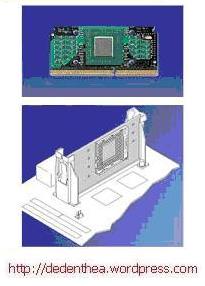
Slot Type

1. Put buffer (bracket) at the two ends of the slot on the motherboard so that the position of peg holes with a hole in the motherboard meet
2. Enter then the locking pegs pegs pegs in holes

Slide the card processor in between the two anchoring and press it to fit exactly into the hole slot.
rakit6.jpg


rakit6.jpg


3. Install Heatsink

Heatsink function is to remove heat generated by the processor via the conduction of heat from the processor to optimize heat transfer heatsink.Untuk the heatsink should be fitted tightly on the top of the processor with some clip as a drag while the contacts on the heatsink surface coated panas.Bila Conductor gene equipped with a fan heatsink then the power connector on the fan is connected to the fan connector on the motherboard.


rakit16.jpg


4. Replacing Memory Modules

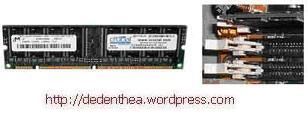
Memory modules are generally installed sequentially from the smallest socket number. The order of installation can be seen from the diagram motherboard.Setiap the SIMM memory module type, DIMM and RIMM can be distinguished by the position of grooves on the sides and bottom of the modul.Cara set for each type of memory module as follows.

SIMM Type

1. Adjust the position of grooves on the module with the bumps in the slot.
2. Insert the module by making a 45 degree angle sloping toward the slot
3. Push until the module is upright in the slot, the locking lever on the slot will automatically lock the module.

rakit7.jpg

rakit8.jpg


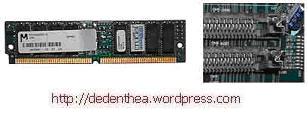
Type DIMM and RIMM

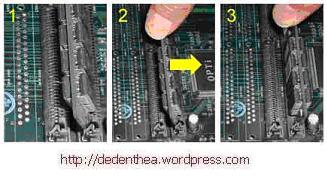
How to install a DIMM and RIMM modules together and there is only one way that will not be reversed because there are two grooves for guidance. Perbedaanya DIMM and RIMM at the position curve

1. Lay locking catches on the end of slots
2. adjust the position of grooves on the connector module with a bulge in the slot. then insert the module into the slot.
3. Locking latches automatically lock the module in the slot when the module is installed right.

rakit9.jpg

rakit10.jpg


5. Replacing the motherboard on the casing

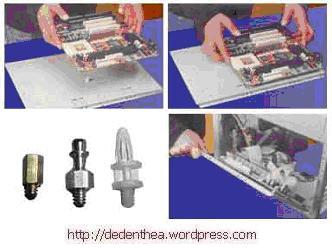
The motherboard is installed into the casing with a screw and holder (standoff). How to install as follows:

1. Determine the position of holes to each holder of plastic and metal. The hole for the metal holder (metal spacer) is characterized by a ring at the edge of the hole.
2. Install metal or plastic holder on the tray casing in accordance with the position of each corresponding mounting holes on the motherboard.
3. Place the motherboard on the casing so that the head holder tray out of the hole on the motherboard. Replace the locking screw on each metal holder.
4. Attach frame I / O ports (I / O sheild) on the motherboard if any.
5. Put tray casing which is mounted the motherboard on the casing and lock with a screw.


rakit11.jpg


6. Install Power Supply

Several types of chassis is equipped with power supply. When the power supply is not included then the way the installation as follows:

1. Enter the power supply at the rack on the back of the casing. Attach the four locking screws.
2. Connect the power connector from the power supply to the motherboard. ATX power connector types have only one way of installation so as not to be reversed. For this type of non-ATX with two separate connectors, the cable-black ground wires must be placed side by side and mounted in the middle of the motherboard power connector. Connect the power cord for the fan, if using a fan for cooling the CPU.


rakit12.jpg


7. Replacing the motherboard and Casing Cable

After the motherboard installed in the chassis next step is installing the cable I / O on the motherboard and the panel with the chassis.

1. Connect the data cable for the floppy drive on the floppy controller on the motherboard connector
2. Connect the IDE cable to the primary and secondary IDE connector on the motherboard.
3. For non-ATX motherboard. Connect the serial and parallel port cable to the connector on the motherboard. Note the position of pin 1 to install.
4. On the back of the casing there is a hole to install additional types of non-slot port. Open the lock plate screw hole closed lalumasukkan port connector ports that want to set up and install a screw back.
5. When the mouse is not yet available ports on the back of the card casing mouse connector should be installed and connected to the mouse connector on the motherboard.
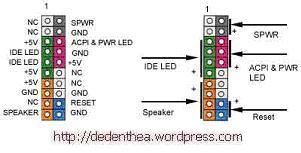
6. Cable connections from the switch connector on the chassis front panel, LED, internal speakers and ports installed in front of the casing if there is to the motherboard. Check your motherboard diagram to locate the proper connector.

rakit13.jpg

rakit14.jpg

rakit15.jpg


8. Install Drive

The procedure to install the hard disk drive, floppy, CD ROM, CD-RW or DVD is the same as follows:

1. Pellet dislodged cover drive bay (space for drives in the chassis)
2. Enter from the front drive bays with the first set the jumper settings (as master or slave) on the drive.
3. Adjust the position of screw holes in the drive and the casing and insert the retaining screw drive.
4. Connect the IDE cable connector to the drive and the connector on the motherboard (the connector is used first primary)
5. Repeat steps 1 samapai 4 for each installation drive.
6. When the IDE cable connected to the du drives make sure the jumper settings are differences both the first drive set as master and the other as slave.
7. Secondary IDE connector on the motherboard can be used to connect two additional drives.
8. Floppy drive is connected to a special connector on the motherboard floppy

Connect the power cord from the power supply to each drive.

rakit17.jpg

9. Installing Adapter Card

Common adapter card that is installed for the video cards, sound, network, modem and SCSI adapters. Video card should generally be mounted and installed before any other adapter card. How to install the adapter:

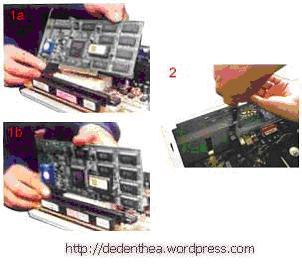
1. Hold the adapter card on edge, avoid touching the component or electronic circuit. Press the card to plug right into the expansion slot on the motherboard
2. Install the retaining screw into the chassis card
3. Reconnect the internal cable card, if any.


rakit17.jpg


10. End Penyelessaian

1. Replace the chassis cover by sliding
2. connect the cable from the power supply into the wall socket.
3. Connect the monitor to the port video card.
4. Plug the phone cord into the modem port if any.
5. Connect the keyboard cable connector and plug the mouse into the mouse port or serial poert (depending on the type of mouse).
6. Connect other external devices such as speakers, joystick, and microphone if there is to the appropriate port. Check the manual of the adapter card to make sure the location of the port.


rakit18.jpg


rakit19.jpg


Examination

The new computers complete assembly can be tested with the BIOS setup program. How do the tests with the BIOS program as follows:

1. Turn on the monitor and system unit. Note the display monitor and sound from the speakers.
2. FOST program of the BIOS will automatically detect the installed computer hardware. If there are errors then display a blank screen and the speaker emits an alert beep on a regular basis as a code indication of errors. Check the reference BIOS code to find fault indication in question by a beep code.
3. If no error occurs, the monitor displays the execution of the POST program. ekan BIOS interrupt button according to the instructions on screen to enter the BIOS setup program.
4. Check all the hardware detection by the BIOS setup program. Some settings may have changed its value, especially the capacity of hard drives and boot sequence.
5. Save changes to the settings and exit the BIOS setup.

After exiting the BIOS setup, the computer will load the operating system with appropriate search order settings in the BIOS boot sequence. Insert the bootable diskette or CD containing the operating system to drive the search.

Handling Problems

Problems that commonly occur in computer assembly and handling, among others:

1. Computer or monitor is not lit, probably caused by the switch or power cord is not connected.
2. Card adapter is not detected due to the installation of card not fitting into the slot /

LED of the hard disk, floppy or CD burning continue due to error or there are wiring connector pins are not fit to connect. Good luck and Good Work.


download indonesia
cara merakit
Click Here

cara membuat blog

Step 1: List of Google
Register yourself on Google
Lho koq? Koq on Google? Says want taught to make a blog on blogger.com, koq even at Google? No one, because to get into blogger, you must have a login google.com.

Please visit http://www.blogger.com. You'll get a page like in the picture below.

If you already have a login in Google, you just log in, then you will go to the Control Panel or Control Panel.

Oh yes, you can choose the language, whether Indonesian or English.

For this time I assume you do not already have a Google login.

Click the big arrow that says Create YOUR BLOG.

So far, very easy and will continue to ease.
Home Page
Step 2: List of Blogs
Complete Your Registration
After you click the big arrow that says Create YOUR BLOG, it will display the form like in the picture below.

This process will create a Google account that you can use on other Google services. If you already have a Google account mungkn from Gmail, Google Groups, or Orkut.

A Google account can be used to access all the facilities provided by Google.

If you already have Accout google, you can simply log in (go). To login to Google, you must log in using your email address.

Please complete.

1. The email address you enter must already exist before. You'll be sent a confirmation to that email. If you use a fake email or email that the new plan will be created, then the application can fail. You do not need to use email gmail.com. Email anything could.

2. Complete the other data.

3. Check "I accept the Terms of Service" as evidence that you agree. BTW you've read?

Once complete, click the arrow that says continue.

Registration Form 1

Registration Form 2
Step 3: Create a Blog
Choosing a Blog Name and Blog URL
If you succeed, you'll be taken to a page like in the picture below. If it fails? Failure is usually because you are wrong verification word. That is reasonable because the word verification is often difficult to read. A patient only, repeat until correct. I own up to repeat 3X.

After you successfully register, you'll be taken to a page like in the picture below. Now you begin to create a blog with your name and address of your blog.

For example, I named the blog with the name Hasna Zahidah. Shhh, do not be suspicious, Hasna was my daughter. I chose the blog address with the address http://hasna-zahidah.blogspot.com
as alaternatif, can also http://hasnazahidah.blogspot.com.

If you make a lens to promote your product or affiliate product, then in choosing a name, must contain the name of the product or service that you offer. For example, if you want to sell my ebook, you can choose key words such as motivation, success, positive thinking, and other key words that match.

You also can research the keywords that are most sought-after people (of course must be related to the product you sell) on
https: / / adwords.google.com / select / KeywordToolExternal

You can check availability of your blog address that you choose. If available can you proceed. If not available, then you must be creative to find other names or modify an existing address, for example added abc, xzy, 101, and can also insert your name.

Continue to click the arrow labeled CONTINUE.
Blog Making Process
Step 4 Blog Templates
Choose a design to suit your taste.
Successful? Of course successful, it is easy koq. If successful, you will be directed to a page like in the picture below.

Choose a theme to suit your taste. If no one within their tastes, do not worry, I'll still many more themes that you can install yourself. Now just choose a theme for pembuatanblog process can be completed. You can preview the themes by clicking the picture.

Choosing a theme for your click (mark) bulatannya o as in the picture below. See my point I made with red arrows.

After that you click the arrow labeled CONTINUE
Selecting Themes
Learning to Create a Blog Done
Now living posting, settings, and layout
Congratulations, now you already have a blog. Now you have started to post your thoughts in blog and shared throughout the world (uh Indonesia).

Indeed, there are still some things you should do, namely setting, layout, adding eleman, and replacement of the theme if you want the theme to another. This advanced level.

At least, you already have a blog and can post. This is already sufficient for the early stages. To explore the problem more in Blog, I encourage you to read eBook Money Blog gets.

In the ebook, not only taught how to blog, but also how to earn money from blogs. I myself have proved it, I get money from blogging. Do not be surprised if my diligent blogging.

download indonesia
cara membuat blog
Click Here

Anonymizing proxy servers

An anonymous proxy server (sometimes called a web proxy) generally attempts to anonymize web surfing. There are different varieties of anonymizers. The destination server (the server that ultimately satisfies the web request) receives requests from the anonymizing proxy server, and thus does not receive information about the end user's address. However, the requests are not anonymous to the anonymizing proxy server, and so a degree of trust is present between the proxy server and the user. Many of them are funded through a continued advertising link to the user.

Access control: Some proxy servers implement a logon requirement. In large organizations, authorized users must log on to gain access to the web. The organization can thereby track usage to individuals.

Some anonymizing proxy servers may forward data packets with header lines such as HTTP_VIA, HTTP_X_FORWARDED_FOR, or HTTP_FORWARDED, which may reveal the IP address of the client. Other anonymizing proxy servers, known as elite or high anonymity proxies, only include the REMOTE_ADDR header with the IP address of the proxy server, making it appear that the proxy server is the client. A website could still suspect a proxy is being used if the client sends packets which include a cookie from a previous visit that did not use the high anonymity proxy server. Clearing cookies, and possibly the cache, would solve this problem.

Open proxy servers

Because proxies might be used to abuse, administrators have developed a number of ways to refuse service to open proxies. Many IRC networks automatically test client systems for known types of open proxy. Likewise, an e-mail server may be configured to automatically test e-mail senders for open proxies. As they are typically difficult to track, open proxies are especially useful to those seeking online anonymity, from political dissidents, to computer criminals, to people who simply require privacy because it is within their rights to do so. Some users are merely interested in anonymity for added security, hiding their identities from potentially malicious websites for instance, or on principle, to facilitate the constitutional human right of freedom of speech.

Groups of IRC and electronic mail operators run DNSBLs publishing lists of the IP addresses of known open proxies, such as AHBL, CBL, NJABL, and SORBS.

The ethics of automatically testing clients for open proxies are controversial. Some experts, such as Vernon Schryver, consider such testing to be equivalent to an attacker portscanning the client host. Others consider the client to have solicited the scan by connecting to a server whose terms of service include testing.

For securing private information during the domain registration process proxy services together with privacy services are often used. In the gTLD their use accounts for 18% +/- 2% of all domain name registrations.

Caching proxy servers

A caching proxy server accelerates service requests by retrieving content saved from a previous request made by the same client or even other clients. Caching proxies keep local copies of frequently requested resources, allowing large organizations to significantly reduce their upstream bandwidth usage and costs, while significantly increasing performance. Most ISPs and large businesses have a caching proxy. Caching proxies were the first kind of proxy server.

Some poorly-implemented caching proxies have had downsides (e.g., an inability to use user authentication). Some problems are described in RFC 3143 (Known HTTP Proxy/Caching Problems).

Another important use of the proxy server is to reduce the hardware cost. An organization may have many systems on the same network or under control of a single server, prohibiting the possibility of an individual connection to the Internet for each system. In such a case, the individual systems can be connected to one proxy server, and the proxy server connected to the main server.

Forward proxies

The terms "forward proxy" and "forwarding proxy" are a general description of behaviour (forwarding traffic) and thus ambiguous. It is used to refer to a proxy able to retrieve from a wide range of sources (in most cases anywhere on the Internet). Except for Reverse proxy, the types of proxies described on this article are more specialized sub-types of the general forward proxy concept.

Hostile proxies

Proxies can also be installed in order to eavesdrop upon the data-flow between client machines and the web. All accessed pages, as well as all forms submitted, can be captured and analyzed by the proxy operator. For this reason, passwords to online services (such as webmail and banking) should always be exchanged over a cryptographically secured connection, such as SSL.

Intercepting proxy servers

An intercepting proxy (also forced proxy or transparent proxy) combines a proxy server with a gateway or router (commonly with NAT capabilities). Connections made by client browsers through the gateway are diverted to the proxy without client-side configuration (or often knowledge). Connections may also be diverted from a SOCKS server or other circuit-level proxies.[5]

RFC 2616 (Hypertext Transfer Protocol—HTTP/1.1) offers standard definitions:

"A 'transparent proxy' is a proxy that does not modify the request or response beyond what is required for proxy authentication and identification".
"A 'non-transparent proxy' is a proxy that modifies the request or response in order to provide some added service to the user agent, such as group annotation services, media type transformation, protocol reduction, or anonymity filtering".

A security flaw in the way that transparent proxies operate was published by Robert Auger in 2009 and advisory by the Computer Emergency Response Team [7] was issued listing dozens of affected transparent, and intercepting proxy servers.

Purpose

Intercepting proxies are commonly used in businesses to prevent avoidance of acceptable use policy, and to ease administrative burden, since no client browser configuration is required. This second reason however is mitigated by features such as Active Directory group policy, or DHCP and automatic proxy detection.

Intercepting proxies are also commonly used by ISPs in some countries to save upstream bandwidth and improve customer response times by caching. This is more common in countries where bandwidth is more limited (e.g. island nations) or must be paid for.

[edit] Issues

The diversion / interception of a TCP connection creates several issues. Firstly the original destination IP and port must somehow be communicated to the proxy. This is not always possible (e.g. where the gateway and proxy reside on different hosts). There is a class of cross site attacks which depend on certain behaviour of intercepting proxies that do not check or have access to information about the original (intercepted) destination. This problem can be resolved by using an integrated packet-level and application level appliance or software which is then able to communicate this information between the packet handler and the proxy.

Intercepting also creates problems for HTTP authentication, especially connection-oriented authentication such as NTLM, since the client browser believes it is talking to a server rather than a proxy. This can cause problems where an intercepting proxy requires authentication, then the user connects to a site which also requires authentication.

Finally intercepting connections can cause problems for HTTP caches, since some requests and responses become uncacheble by a shared cache.

Therefore intercepting connections is generally discouraged. However due to the simplicity of deploying such systems, they are in widespread use.

Implementation Methods

Interception can be performed using Cisco's WCCP (Web Cache Control Protocol). This proprietary protocol resides on the router and is configured from the cache, allowing the cache to determine what ports and traffic is sent to it via transparent redirection from the router. This redirection can occur in one of two ways: GRE Tunneling (OSI Layer 3) or MAC rewrites (OSI Layer 2).

Once traffic reaches the proxy machine itself interception is commonly performed with NAT (Network Address Translation). Such setups are invisible to the client browser, but leave the proxy visible to the web server and other devices on the Internet side of the proxy. Recent releases of Linux and some BSD provide TPROXY (Transparent Proxy) which performs IP-level (OSI Layer 3) transparent interception and Spoofing of outbound traffic. Hiding the proxy IP address from other network devices.

Detection

There are several methods that can often be used to detect the presence of an an intercepting proxy server:

  • By comparing the client's external IP address to the address seen by an external web server, or sometimes by examining the HTTP headers received by a server. A number of sites have been created to address this issue, by reporting the user's IP address as seen by the site back to the user in a web page.[1]
  • By comparing the sequence of network hops reported by a tool such as traceroute for a proxied protocol such as http (port 80) with that for a non proxied protocol such as SMTP (port 25). [2],[3]
  • By attempting to make a connection to an IP address at which there is known to be no server. The proxy will accept the connection and then attempt to proxy it on. When the proxy finds no server to accept the connection it may return an error message or simply close the connection to the client. This difference in behaviour is simple to detect. For example most web browsers will generate a browser created error page in the case where they cannot connect to an HTTP server but will return a different error in the case where the connection is accepted and then closed. [8]

Reverse proxy servers

A reverse proxy is a proxy server that is installed in the neighborhood of one or more web servers. All traffic coming from the Internet and with a destination of one of the web servers goes through the proxy server. The use of "reverse" originates in its counterpart "forward proxy" since the reverse proxy sits closer to the web server and serves only a restricted set of websites.

There are several reasons for installing reverse proxy servers:

  • Encryption / SSL acceleration: when secure web sites are created, the SSL encryption is often not done by the web server itself, but by a reverse proxy that is equipped with SSL acceleration hardware. See Secure Sockets Layer. Furthermore, a host can provide a single "SSL proxy" to provide SSL encryption for an arbitrary number of hosts; removing the need for a separate SSL Server Certificate for each host, with the downside that all hosts behind the SSL proxy have to share a common DNS name or IP address for SSL connections. This problem can partly be overcome by using the SubjectAltName feature of X.509 certificates.
  • Load balancing: the reverse proxy can distribute the load to several web servers, each web server serving its own application area. In such a case, the reverse proxy may need to rewrite the URLs in each web page (translation from externally known URLs to the internal locations).
  • Serve/cache static content: A reverse proxy can offload the web servers by caching static content like pictures and other static graphical content.
  • Compression: the proxy server can optimize and compress the content to speed up the load time.
  • Spoon feeding: reduces resource usage caused by slow clients on the web servers by caching the content the web server sent and slowly "spoon feeding" it to the client. This especially benefits dynamically generated pages.
  • Security: the proxy server is an additional layer of defense and can protect against some OS and WebServer specific attacks. However, it does not provide any protection to attacks against the web application or service itself, which is generally considered the larger threat.
  • Extranet Publishing: a reverse proxy server facing the Internet can be used to communicate to a firewalled server internal to an organization, providing extranet access to some functions while keeping the servers behind the firewalls. If used in this way, security measures should be considered to protect the rest of your infrastructure in case this server is compromised, as its web application is exposed to attack from the Internet.

Suffix proxies

A suffix proxy server allows a user to access web content by appending the name of the proxy server to the URL of the requested content (e.g. "en.wikipedia.org.example.com").

Suffix proxy servers are easier to use than regular proxy servers. The concept appeared in 2003 in form of the IPv6Gate and in 2004 in form of the Coral Content Distribution Network, but the term suffix proxy was only coined in October 2008 by "6a.nl"[citation needed]. sixxs.org is a popular suffix proxy, providing an IPv6 tunnel to IPv4 hosts.

Tunneling proxy servers

A tunneling proxy server is a method of defeating blocking policies implemented using proxy servers. Tunneling proxy servers are used by people who have been blocked from viewing a particular web site. Most tunneling proxy servers are also proxy servers of varying degrees of sophistication, which effectively implement "bypass policies".

A tunneling proxy server is a web-based page that takes a site that is blocked and "tunnels" it, allowing the user to view blocked pages. A famous example is elgooG, which allowed users in China to use Google after it had been blocked there. elgooG differs from most tunneling proxy servers in that it circumvents only one block.

A September 2007 report from Citizen Lab and BBC.co.uk recommended secure based proxies HTTP tunnel, StupidCensorship, and CGIProxy. Alternatively, users could partner with individuals outside the censored network running Psiphon or Peacefire/tunneling proxy server. A more elaborate approach suggested was to run free tunneling software such as FreeGate, or pay services Anonymizer and Ghost Surf. Also listed were free application tunneling software PaperBus, Gpass and HTTP Tunnel, and pay application software Relakks and Guardster. Lastly, anonymous communication networks JAP ANON, Tor, and I2P offer a range of possibilities for secure publication and browsing.[9]

Other options include Garden and GTunnel by Garden Networks.

Students are able to access blocked sites (games, chatrooms, messenger, offensive material, internet pornography, social networking, etc.) through a tunneling proxy server. As fast as the filtering software blocks tunneling proxy servers, others spring up. However, in some cases the filter may still intercept traffic to the tunneling proxy server, thus the person who manages the filter can still see the sites that are being visited.

Another use of a tunneling proxy server is to allow access to country-specific services, so that Internet users from other countries may also make use of them. An example is country-restricted reproduction of media and webcasting.

The use of tunneling proxy servers is usually safe with the exception that tunneling proxy server sites run by an untrusted third party can be run with hidden intentions, such as collecting personal information, and as a result users are typically advised against running personal data such as credit card numbers or passwords through a tunneling proxy server.

In some network configurations, clients attempting to access the proxy server are given different levels of access privilege on the grounds of their computer location or even the MAC address of the network card. However, if one has access to a system with higher access rights, one could use that system as a proxy server for which the other clients use to access the original proxy server, consequently altering their access privileges.

Web proxies

A proxy that focuses on World Wide Web traffic is called a "web proxy". The most common use of a web proxy is to serve as a web cache. Most proxy programs provide a means to deny access to URLs specified in a blacklist, thus providing content filtering. This is often used in a corporate, educational, or library environment, and anywhere else where content filtering is desired. Some web proxies reformat web pages for a specific purpose or audience, such as for cell phones and PDAs.Web Server is an intermediate server between client request and server resource

Content-filtering web proxies

A content-filtering web proxy server provides administrative control over the content that may be relayed through the proxy. It is commonly used in both commercial and non-commercial organizations (especially schools) to ensure that Internet usage conforms to acceptable use policy. In some cases users can circumvent the proxy, since there are services designed to proxy information from a filtered website through a non filtered site to allow it through the user's proxy.

A content filtering proxy will often support user authentication, to control web access. It also usually produces logs, either to give detailed information about the URLs accessed by specific users, or to monitor bandwidth usage statistics. It may also communicate to daemon-based and/or ICAP-based antivirus software to provide security against virus and other malware by scanning incoming content in real time before it enters the network.

Many work places, schools, and colleges restrict the web sites and online services that are made available in their buildings. This is done either with a specialized proxy, called a content filter (both commercial and free products are available), or by using a cache-extension protocol such as ICAP, that allows plug-in extensions to an open caching architecture.

Some common methods used for content filtering include: URL or DNS blacklists, URL regex filtering, MIME filtering, or content keyword filtering. Some products have been known to employ content analysis techniques to look for traits commonly used by certain types of content providers.

Requests made to the open internet must first pass through an outbound proxy filter. The web-filtering company provides a database of URL patterns (regular expressions) with associated content attributes. This database is updated weekly by site-wide subscription, much like a virus filter subscription. The administrator instructs the web filter to ban broad classes of content (such as sports, pornography, online shopping, gambling, or social networking). Requests that match a banned URL pattern are rejected immediately.

Assuming the requested URL is acceptable, the content is then fetched by the proxy. At this point a dynamic filter may be applied on the return path. For example, JPEG files could be blocked based on fleshtone matches, or language filters could dynamically detect unwanted language. If the content is rejected then an HTTP fetch error is returned and nothing is cached.

Most web filtering companies use an internet-wide crawling robot that assesses the likelihood that a content is a certain type (e.g. "This content is 70% chance of porn, 40% chance of sports, and 30% chance of news" could be the outcome for one web page). The resultant database is then corrected by manual labor based on complaints or known flaws in the content-matching algorithms.

Web filtering proxies are not able to peer inside secure sockets HTTP transactions, assuming the chain-of-trust of SSL/TLS has not been tampered with. As a result, users wanting to bypass web filtering will typically search the internet for an open and anonymous HTTPS transparent proxy. They will then program their browser to proxy all requests through the web filter to this anonymous proxy. Those requests will be encrypted with https. The web filter cannot distinguish these transactions from, say, a legitimate access to a financial website. Thus, content filters are only effective against unsophisticated users.

As mentioned above, the SSL/TLS chain-of-trust does rely on trusted root certificate authorities; in a workplace setting where the client is managed by the organization, trust might be granted to a root certificate whose private key is known to the proxy. Concretely, a root certificate generated by the proxy is installed into the browser CA list by IT staff. In such scenarios, proxy analysis of the contents of a SSL/TLS transaction becomes possible. The proxy is effectively operating a man-in-the-middle attack, allowed by the client's trust of a root certificate the proxy owns.

A special case of web proxies is "CGI proxies". These are web sites that allow a user to access a site through them. They generally use PHP or CGI to implement the proxy functionality. These types of proxies are frequently used to gain access to web sites blocked by corporate or school proxies. Since they also hide the user's own IP address from the web sites they access through the proxy, they are sometimes also used to gain a degree of anonymity, called "Proxy Avoidance".

Risks of using anonymous proxy servers

In using a proxy server (for example, anonymizing HTTP proxy), all data sent to the service being used (for example, HTTP server in a website) must pass through the proxy server before being sent to the service, mostly in unencrypted form. It is therefore a feasible risk that a malicious proxy server may record everything sent: including unencrypted logins and passwords.

By chaining proxies which do not reveal data about the original requester, it is possible to obfuscate activities from the eyes of the user's destination. However, more traces will be left on the intermediate hops, which could be used or offered up to trace the user's activities. If the policies and administrators of these other proxies are unknown, the user may fall victim to a false sense of security just because those details are out of sight and mind.

In what is more of an inconvenience than a risk, proxy users may find themselves being blocked from certain Web sites, as numerous forums and Web sites block IP addresses from proxies known to have spammed or trolled the site. Proxy bouncing can be used to maintain your privacy.

If you use a proxy on college/work/school you may be disciplined for bypassing the Filter implemented by the staff. This type of activity could lead to disciplinary punishment if such actions are prohibited by the institution or business whose Internet connection you use.